
M-Pesa · Airtel Money · Visa · Mastercard · Built for Kenya
Best M-Pesa POS System in Kenya 2026
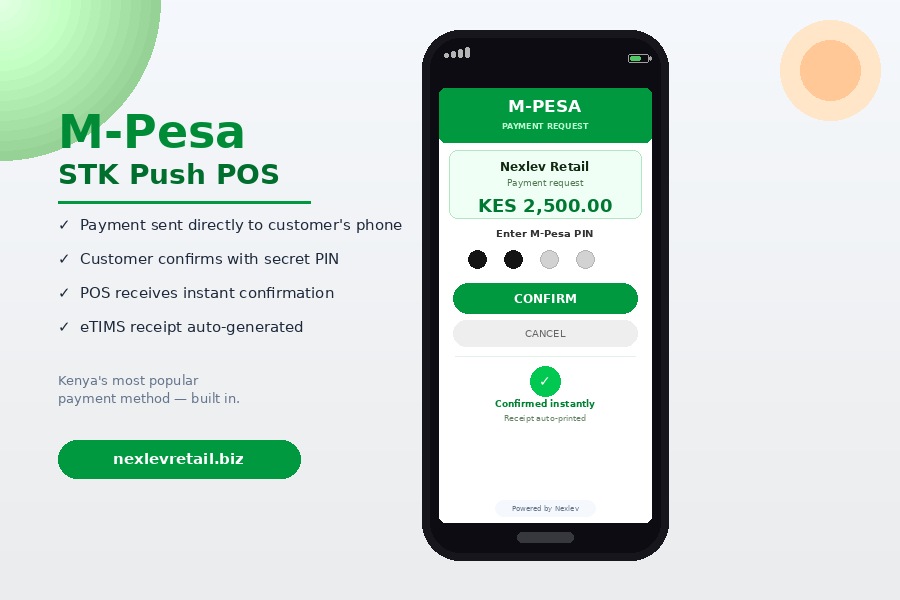
Over 80% of non-cash payments in Kenya go through M-Pesa. If your POS system requires cashiers to manually check M-Pesa SMS messages and match them to sales, you are losing time, creating fraud risk, and slowing down every customer. The best M-Pesa POS system in Kenya for 2026 uses STK Push — which sends an automatic payment prompt directly to the customer's phone, confirms the payment instantly on the POS screen, and links it to a KRA eTIMS invoice without any manual step. Nexlev Retail does exactly this.
How It Works
How M-Pesa STK Push Works on Nexlev Retail
Cashier Enters Amount
The cashier scans products and the POS calculates the total. One tap to select M-Pesa as the payment method.
STK Push Sent to Customer
The customer receives an automatic STK Push prompt on their phone with the exact amount to pay — no Paybill number to type in.
Customer Enters PIN
The customer enters their M-Pesa PIN on their phone. No separate transaction reference to note or SMS to check.
Payment Confirmed Instantly
Within 3 to 5 seconds, the POS screen shows "Payment Received." The cashier does not check any SMS message — ever.
eTIMS Invoice Auto-Generated
Nexlev instantly generates and submits a KRA eTIMS-compliant invoice to the KRA portal. The KRA QR code appears on the customer receipt automatically.
Receipt Printed or WhatsApp
Print the receipt or send it directly to the customer's WhatsApp. The whole process takes under 10 seconds from total to receipt.
Why It Matters
STK Push vs Manual M-Pesa — Why It Matters
Manual M-Pesa means cashiers check SMS messages for every payment. STK Push eliminates that entirely.
| Factor | Manual M-Pesa (SMS Check) | Nexlev STK Push ✅ |
|---|---|---|
| Payment speed | Slow (30-90 seconds) | Instant (3-5 seconds) |
| Fraud risk | High (fake SMS) | Zero (verified by Safaricom) |
| Cashier workload | High (manual check every sale) | Zero (automatic) |
| Link to eTIMS invoice | Manual — error-prone | Automatic — instant |
| Audit trail | No — SMS can be deleted | Full — every transaction recorded |
| Customer experience | Poor — waiting, confusion | Excellent — fast and clear |
| Error rate | High (wrong amounts, missed payments) | Zero |
Every Payment Method
All Payment Methods Nexlev Supports
Accept every way a Kenyan customer wants to pay — all in one system, all linked to eTIMS automatically.
M-Pesa STK Push
Auto-confirmed. No SMS checking. Works with Paybill and Till numbers. Instant reconciliation.
Airtel Money
Accept Airtel Money payments alongside M-Pesa — no separate device or process needed.
Visa / Mastercard
Accept card payments via integrated card terminals. All card transactions linked to eTIMS invoices automatically.
Cash
Cash payments tracked precisely. Change calculated automatically. Cash vs other payment reconciliation every shift.
Credit Accounts
For trusted customers. Record sales on credit, set limits, generate monthly statements, and track outstanding balances.
Bank Transfer
Record bank transfer payments and link them to invoices. Useful for large wholesale or institutional orders.
One System. Full Compliance.
M-Pesa + KRA eTIMS in One System
Before Nexlev Retail, Kenyan businesses faced a two-step problem: accept the M-Pesa payment, then separately create a KRA eTIMS invoice. This double entry created errors, delays, and compliance gaps — especially when the cashier was busy and forgot to create the invoice.
With Nexlev Retail, M-Pesa payment and eTIMS invoicing happen simultaneously. The moment the customer's M-Pesa STK Push is confirmed, Nexlev automatically generates the eTIMS invoice, submits it to the KRA portal, attaches the KRA QR code to the receipt, and records the full transaction — all in the same 3-5 second window.
This means every M-Pesa sale in your business is automatically KRA compliant. There is no separate invoicing step, no manual KRA upload, and no end-of-day reconciliation headache.
For businesses operating across supermarkets, minimarts, pharmacies, and all other retail types — every location benefits from the same seamless M-Pesa plus eTIMS integration. Learn more about the eTIMS side on our KRA eTIMS POS page.
Transparent Pricing
M-Pesa POS Pricing in Kenya
M-Pesa STK Push is included in every Nexlev Retail plan. No extra integration fees. Priced in Kenyan Shillings.
Common Questions
Frequently Asked Questions
How does M-Pesa STK Push work on Nexlev Retail's POS system?
When a customer pays with M-Pesa, the cashier enters the sale amount in Nexlev Retail and the system automatically sends an STK Push prompt to the customer's phone. The customer enters their M-Pesa PIN, and payment is confirmed on the POS screen within seconds — with no manual SMS checking required.
Does Nexlev Retail support M-Pesa Paybill and Till numbers?
Yes. Nexlev Retail supports both M-Pesa Paybill and Till number integration. The system can be configured to your existing Paybill or Till number, so all payments go directly to your registered M-Pesa business account.
What happens if the internet goes down during an M-Pesa transaction?
If the internet goes down, Nexlev Retail switches to offline mode. M-Pesa STK Push requires internet to process, so in offline mode the system records cash transactions. As soon as connectivity is restored, all data syncs and eTIMS invoices are submitted to KRA automatically.
Can Nexlev Retail accept Airtel Money as well as M-Pesa?
Yes. Nexlev Retail supports Airtel Money payments in addition to M-Pesa. Cash, Visa, Mastercard, and credit account payments are also supported — giving your customers every payment option they need.
Does Nexlev auto-generate KRA eTIMS invoices for M-Pesa payments?
Yes. Every M-Pesa payment processed through Nexlev Retail automatically triggers a KRA eTIMS-compliant invoice that is submitted to the KRA portal in real time. There is no need for separate invoicing — compliance is built into every transaction.
Ready when you are
Book a free demo.
A 20-minute walkthrough showing M-Pesa STK Push working live with your products. See the payment confirmed in seconds — and the eTIMS invoice auto-generated.
No card needed. No pressure. Just a real look at how it works.
See your own products in a live till with M-Pesa
Get a straight answer on pricing, in shillings